
The appraiser portal, in the inspector's pocket
The ValueClever field app: bid on jobs, record the site visit, and upload documents without going back to the office.
Get the ValueClever app on Google Play. It uses the same account as the platform.
Get it onGoogle PlayWhat field teams see
Indicators
In progress, awaiting approval, and approved — for appraisers and office staff.
My files / my inspections
Assigned files with property, team, and value details.
Requests
The inspection marketplace by coverage region — accept before someone else does.
Chat
Internal messaging for firm staff (hidden from independent field inspectors).
Directory
Clients, regions, cities, and property types — for office roles.
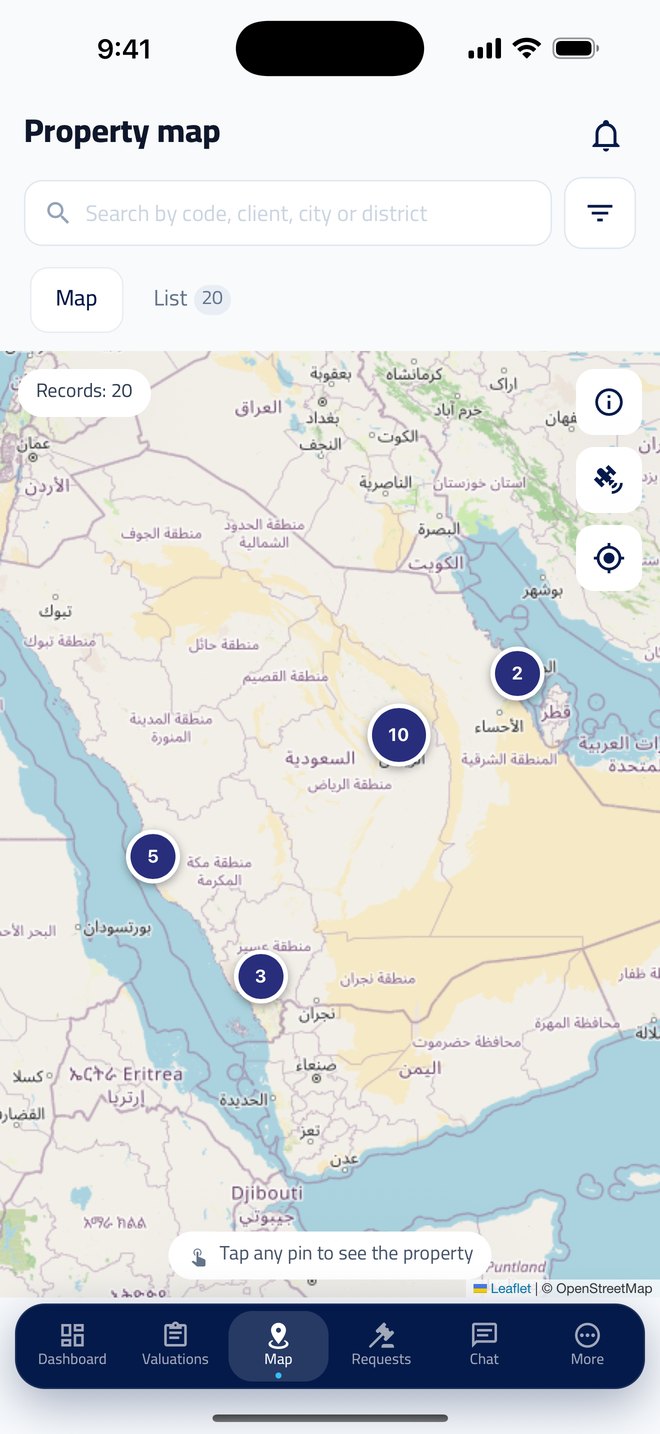
Built for movement on site
On-site visit
Owner details, map link, and upload of photos, deed, and permit from the phone.
Instant notices
A new job in your region, an accepted offer, or an assignment cancelled for lateness.
Biometric lock
Fingerprint lock to protect transaction data on a field device.
Arabic first
A full Arabic interface with an instant switch to English.
An inspector's day in the app
- 1
A job lands in your region
A notice arrives with the suggested fee and due time — before someone else accepts.
- 2
Accept the offer
First accept wins, and the file appears immediately under My inspections.
- 3
On site
Open the visit page: owner, map link, and upload of photos, deed, and permit.
- 4
Close and follow
After upload the status updates, and the due amount shows in the financial ledger.
Field app FAQs
Where do I download the app?
On Google Play as ValueClever. It uses the same account and your firm’s data. The iPhone version is coming soon to the App Store.
Can inspectors accept jobs from the phone?
Yes — the Requests tab shows the inspection marketplace by coverage, and first accept wins.
What can I upload on site?
The visit page supports owner details, a map link, and upload of photos, deed, and permit from the phone.
Does the app support a security lock?
Yes — biometric fingerprint lock to protect transaction data on a field device.
Is the interface Arabic?
Yes — Arabic first, with an instant switch to English.
See the platform run on your firm's data
We'll walk you through the console, the external portal, and the field app in one session.